Thomas Doukinitsas
Showing posts with label Maps and Journeys. Show all posts
DANCE VIDEO: Choreography Workshop

DANCE VIDEO: Choreography Workshop

Our dance workshop with Rachel started off with some screenings to better understand the context of dance film and music videos. These films were:
  • "The little lost child" 1894
  • "Dance Serpentine" by lumiere brothers
  • "Pas De deux" 1902
  • "The magic lantern" by George melies 1903
  • "Alice in wonderland" 1903

Allot of older films treat dance as if its happening on a stage
In newer films an important part is camera movements and how they follow the dance.


Dance split in to two ideas: entertainment and conceptual
  • Busby Berkeley 1930 Aesthetically pleasing patterns with a big number of dancers Focused on entertainment
  • Mary wigman 1929 Conceptual, self indulgent.

Dance in earlier films moving image was main focus due to lac of sound
As sound came in acting and singing to over as the main medium of communicating
Modern dance artists continued on with their work but their main concern was of dance was made specifically for film


Then we were questioned to observe the role of dance and write some personal notes on the following films:
  • "Mached" by lxd I like the fact that they are using objects Emotions
  • "1234" by Feist Looks cool, reminds me of Berkeley, dance feels a bit out of place though
  • "Sunrise" by Yeasayer Good use of camera movements, has a nice concept Cuts follow the dance
  • "Choreography Reel" by Tamara Levinson Quite bold movements, visually interesting Black BG doesn't distract from the dance
  • "Rosas danst rosas"  by rosas Very precise Movements
  • "Ghostcatching" by Bill T Jones, Kaiser and Shelley Eshkar Visually very stunning Good idea to visually race the movement Cutting edge technology for the time
  • "Guns and horses" by Ellie Golding Too many separate things merged together superficially Dancers and singer a bit out of place

After that we jumped in to some basic movement workshops ourselves, in groups, to better understand how dance may be manifested. We were assigned in rough groups, however me, Lucy, Joel and Shahid combined and formed an idea that we are thinking of using for our final piece.

Our idea is about a person who is living a mundane life, and is in a room or an office, moving in a repetitive and boring fashion. Suddenly his reflection in the mirror tries to disrupt this repetitive pattern and convince the real person to "live life" and break free from this repetitive movement.

Trying out our idea with the professional dancers was extremely useful, and may even be a starting point for our final piece.

MAPS & JOURNEYS: Digital Circuitry & Gallery Installation

MAPS & JOURNEYS: Digital Circuitry & Gallery Installation

To further develop our project for the gallery, it was decided to update the visuals with a more abstract and digital theme. We decided upon showing circuitry and roughly relating the concepts that applied to the prototype.

As it's my job to do the visuals i decided to study images of circuits

From the images that i found this one stood out quite allot due to it's colors and high tech look.

i used after effects to play around and create a simplified circuit board. This was done by creating a series of masks and applying a stroke effect to the layer

Using a duplicate of that layer, and some other effects i then started to experiment with the look of electricity flowing through the boards. These are some early tests:

With some rough assets ready, i started to create the Quartz Composer composition to test out the project. After a few hours i had quite a big chunk of the composition complete
 also as you can see i tried to better organise the composition flowchart to easily find things

Also i grouped smaller functions in to sub-patches that would render things in images to be used in the main composition.


During installation week though is where the finalization happened...


 Overall i am extremely pleased with the results, and it has been incredible seeing people interact and ask questions about our project, and explaining all of the process is a joy!


MAPS & JOURNEYS: Evaluation & Gallery Plan

MAPS & JOURNEYS: Evaluation & Gallery Plan

I believe that we did pretty well as a group, and I believe that I’ve learned some valuable things personally.

As a group, we came up with a really ambitious project, and sometimes it even came to the point where we doubted ourselves. However we managed to overcome our doubts and materialize our idea in to a physical and working design.

Personally I was not entirely sure if I could pull off the technical part of this project, but looking around I’ve learned that you can find resources to help you everywhere. Hell, even googling a question will quite possibly come up with an answer. That’s how I managed to overcome some technical obstacles during this project, by searching and using what other people had come up with (eg. software plug ins, example projects), dissecting those, and then re-applying it to our needs.

Also I believe that we worked well as a group, sharing and assigning responsibilities.

However i believe that we should have started doing more practical experiments earlier on. Our mistake was spending too much time conceptualizing our piece.


Concluding, even though we had quite a few little obstacles, we did well and i am happy with the final result.

Also here is the gallery plan:

MAPS & JOURNEYS: Finishing the Brain Controller

MAPS & JOURNEYS: Finishing the Brain Controller

In order to finish building our project, as a group we decided to book a room to facilitate our needs

With Julia and Josh working on finishing the vacuum forming, me and Lauren went to get a plinth that we had given to Chris, the studio manager, for safe keeping (recycled from our studio shoot)


Julia had pleasantly surprised us and went ahead and bought a MaKey MaKey controller kit (mentioned in a previous post as an idea), therefore we could now build our prototype as we had originally intended to.

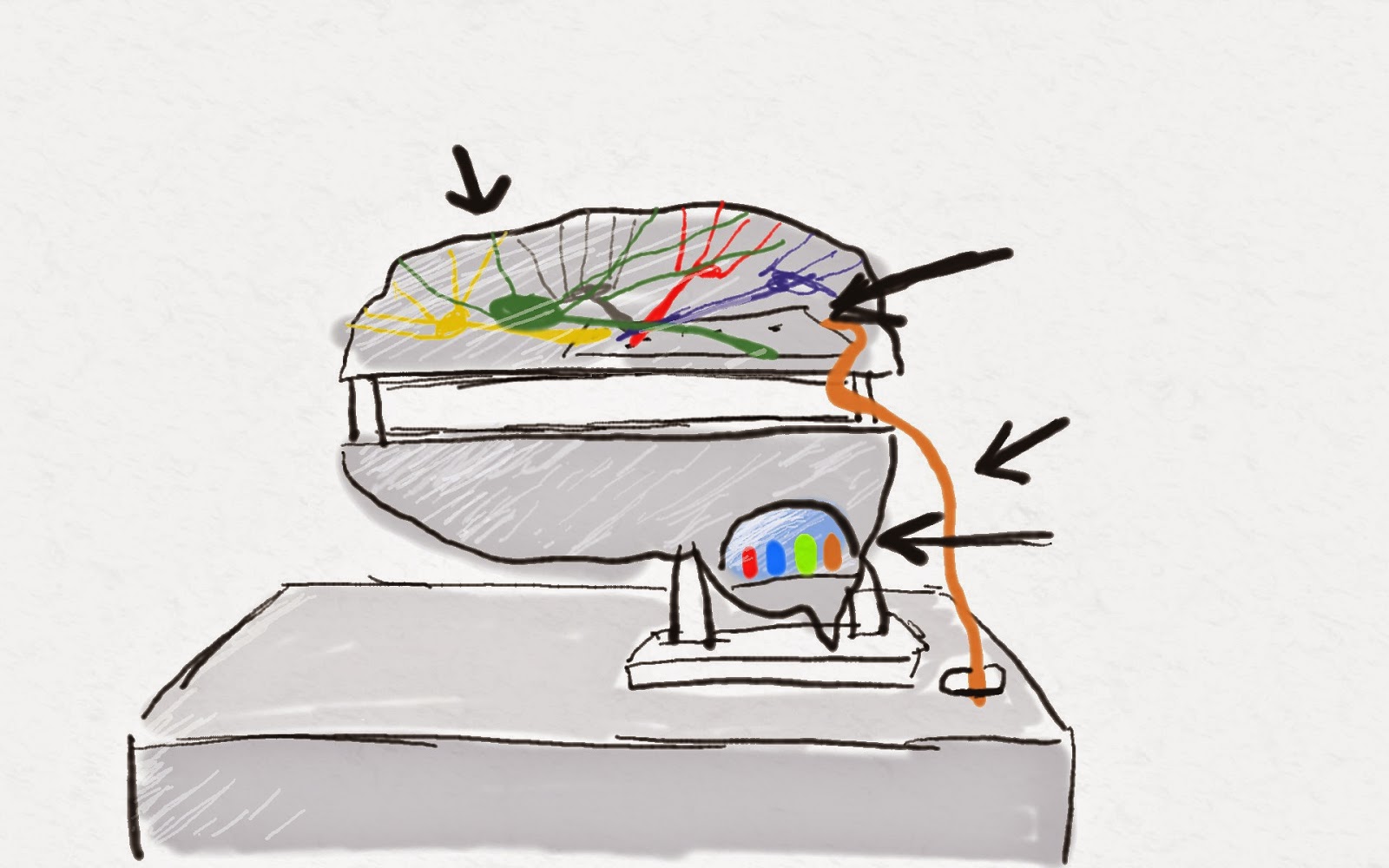
The way a MaKey MaKey works is it creates a number of circuits between a board, wires and the user's own body. When a specific circuit is closed, an assigned key press is activated.


These key presses are then fed in to the computer using a regular USB connection.

Since the MaKey MaKey by default registers the Up, Down, Left & Right keys, i had to re-assign the key commands in the Quartz Composer project.

With the reconfiguration done, and the plastic brain cut to size, we tested out some of the layout of our final piece, and booked additional equipment (TV & Speakers).

Lastly we went to Homebase as Julia had the idea of forming a base for our brain to help it stand up. Her job was to then assemble the MaKey MaKey in to the plastic brain.


Another idea that we had was the idea of having an led light to light up the brain, to add to the artistic and stylized look we were going for, and to also represent the brain activities.

MAPS & JOURNEYS: Finishing the Software

MAPS & JOURNEYS: Finishing the Software

Continuing on from the last post, whilst Lauren was editing the video, Julia was forming the brain and Josh was editing the audio, i edited the images.

These are the final images used in the project. I decided to go for a very high contrast black and white style to show detail, but at the same time remove some of it.


This style was achieved by playing with the Highlight, Shadow, Blacks, Whites, Detail and Saturation sliders in camera raw. Then in Photoshop i darkened the edges of the frame, focusing the eye on singular details within the image.


At this point the edited video and sounds were ready. Since the Quartz project was modularly designed, it was easy to just replace the video and image with the new ones.

At this step i watched the following tutorials to help me with what i was about to do next:

The images were programmed to be scanned from their folder, and then play one after another back and forth.


This was then rendered in it's own patch for further manipulation, so that a matte could be added in the original composition to give the appearing effect when the sequence is activated


Now, the sound was to be imported.


Since Quartz Composer does not have any tools for audio, i had to download some from http://kinime.net, a website with free plug-ins and resources, forums, etc on Quartz Composer.

The audio was loaded in to the patch. A series of other patches tell the audio player what speakers to use, and then lastly to synchronise the Audio with the picture the Movie Importer tells the Audio Player it's current position.

The same was done for the distorted sounds (loaded as one pre-rendered clip), but connected to a different toggle.

Now with everything linked in to place, and a few extra math patches and switches added to disable the distorted sound and images when the final video is loaded, this is what the final nodes look like:


This is a quick demo of what the final Quartz Composition looks like when run:

MAPS & JOURNEYS: Shoot

MAPS & JOURNEYS: Shoot

After receiving feedback on our initial tests we decided to go for a more generalized concept for our shoot, aimed at a wider audience.

During a walk through farnham park we thought that walking a dog here would be an excellent idea for our POV shoot.

Julia thankfully managed to find a dog for our shoot.

Our plan was to walk in a circle round farnham park, therefore making it easy to loop. However after many failed attempts we saw that it wasn't working 100%.

However, after the first few takes we managed to get a good take, this time walking from the park to the city (to get some interesting changes in sound/visuals).

During this take we had some fortunate accidents, eg. another dog approached and interacted with our dog.


As me and Lauren were focusing on shooting the visuals, Julia was grabbing sounds to use.

Lastly, we did the same walk, but this time i captured detail images for the picture section of our project. Here are some examples:


Returning home, the tasks were split as follows:

  • Lauren was in charge of editing the video and making it loop
  • Josh was to edit the sound recordings
  • Julia focused on building the model brain
  • My job was to edit the pictures and program the software.

MAPS & JOURNEYS: Creating the Software

MAPS & JOURNEYS: Creating the Software

As i said in previous posts i would be using Quartz Composer, mainly because of it's ease of use, versatility and compatibility with macs.

First i started with bringing in the test video we shot, and start placing in in the composition.

Then i started by bringing in the keyboard inputs, that later could be mapped to the brain model's sensors.

Some additive math created a value that would show how many of the specified keys were pressed at once.

When that value reached 4, a conditional node (if... then) would activate the final video.

Each individual key would then be connected to activate it's own individual element.

This is what the node graph looked like so far.


After a few more hours working on it, and tidying up the flowchart i ended up with this


So far i've only done the emotions, images and final parts, and only in a rough form. However the main building blocks are now in place and i've made sure they are easily interchangeable.

Emotions, Signified by an explosion of colors.

Images straight from the eye, shown by black and white lifeless images.

The Final Result, when all of the elements merge.
Now the main focus is the sound, and how the sensors will connect to a keyboard...

MAPS & JOURNEYS: Test Shoot

MAPS & JOURNEYS: Test Shoot

After having figured out what we would see on the screen, it was time to start testing out our vision.

We started by trying to find locations. As we didn't have enough time to think about an exact location, we used a similar approach as our psychogeography project: just go out there and do it.
By leaving this to chance we may get some pleasant surprises.

After looking at a few locations walking towards farnham centre, we found them to be boring/quiet, with not enough detail to use in all of the senses we needed.


We tried filming near a busy road with cars, and although more effective, it still seemed like it was lacking something.


However, after looking back on our failed attempts, as we were walking home we decided that maybe an interior shoot would be more interesting and be more controlled.

The next day, we came up with a little loopable scenario of someone's everyday life:
Person wakes up, goes downstairs, puts kettle on, plays with tablet, makes tea, goes to bedroom, turns tv on and falls back to sleep.

We initially tried some tests where i was holding the camera and performing the actions, but this didn't work in situations where the person's hands needed to do something in shot.

Therefore in the end Lauren ended up being the actor, and as she performed the actions, i awkwardly held the camera roughly in front of her face, trying to imitate where she would look at.


Also, to help us out we split the one continuous shot in to a series of takes.

We also added some little details as we were figuring out the shots.

All and all, we got the shots that we needed and we had good fun as this was all spontaneous.

After Lauren started the edit, she suggested doing a series of jump cuts to help the pacing, since it was too boring.