Thomas Doukinitsas
Showing posts with label Innovation and Interference. Show all posts
DANCE VIDEO: Working on the set of "Elysian"

DANCE VIDEO: Working on the set of "Elysian"

Other than our dance video, i had the fantastic opportunity to work on the set of Laura, Lauren, Katherine and Mollies group film "Elysian" as a Camera Operator.

I was called in as most of the group already had roles (Laura and Mollie co-directing, Lauren producing and making sure everything goes to schedule, and Katherine filming behind the scenes) and big rig such as the EX-3 combined with a glidecam needed it's own crew to handle it.

Setting up the camera was easier this time as we had already done the same rig for our own shoot.

Both me and shahid worked under the strict direction of Laura in order to get the shots that she and mollie imagined. Something that i learned on this shoot was to carefully listen to directions, but also suggest ideas that may fix problems on set.

One of these problems was the lighting. Since the group had originally imagined the lighting as backlit, they tried it out but the light was clearly visible. It was my suggestion then to add two blue lights behind the actors, one off camera at the left and one off camera at the right. This quickly solved the backlighting problem and allowed the group to carry on with the shoot.

Overall it was a very fun experience, and it was nice to work on such a different shoot then ours. Definitely worth it even just for this photo...:


DANCE VIDEO: Evaluation and Reflections

DANCE VIDEO: Evaluation and Reflections

During this project i had to learn some things the hard way, especially during the post-production process.

The first thing i learned was that the "We'll fix it in post" attitude is bad practice and SHOULD BE AVOIDED AT ALL COSTS. During the shoot as a visual effects supervisor if i had just asked around for a black cloth to put on the floor we could have avoided so many of the masking shots, freeing up time for the more important sequences such as Amelia passing through the mirror. Therefore next time if i ever am a visual effects supervisor instead of thinking how things could be fixed in post production i will try and think of ways of avoiding visual effects for silly things.

The second thing that i could have done better was enforce a final cut from the beginning before we started the visual effects. Even though i know this would be hard since we got our feedback in the middle of the edit, and we had such a tight shedule, it would have saved allot of time and avoided allot of stress during the last few days of post production.

Lastly i would like to apologise to the entire team for being late on multiple occasions during post production (coming in at 12pm instead of 10am), and although thankfully it didn't affect the work it was extremely unprofessional of me and in the industry such behavior could have been extremely damaging. Amazingly after realizing this, i managed to come in 9:50am sharp for all of the other days!

Overall though i am extremely happy with how this project developed from a quick idea that came up during a dance workshop. As a team we have managed to bond very well and figure out how to work together, and i really enjoyed the concept of experimentation throughout the entire process. This experimentation leads to ideas being generated quickly and most of all... allot of fun!

Our dancer was an absolute pleasure to work with, and i hope that in the future we work with talent that are proactive and are willing to contribute their own ideas to the project.

As a camera operator i got to work on two shoots including ours, with some great gear and learn from first hand how rigorous and hard a shoot can be, and how to react quickly to situations.

Post-Production was an amazing experience, and despite the problems and long hours, i felt comfortable in such an environment and believe that i would be happy in a post-production career.

So... after all of that i am proud to present the product of our hard work:

DANCE VIDEO: Post Production

DANCE VIDEO: Post Production

ROUGH EDIT:
After finishing the shoot and all the footage was backed up Lucy started the rough edit in Adobe Premiere Pro, as she felt she would be more comfortable with it. After a bit of initial research i reassured her that it would be possible to convert the project file to Avid Media Composer, our software of choice for Color Grading and Finishing since we had booked the Avid Suite.

CONFORMING TO AVID:
Lucy's Premiere Pro Timeline
Since the rough edit was done by Lucy in Premiere Pro, and the final color grade would be done in Avid Media Composer, we needed a way to get the timeline transferred from one application to the other.

Since Premiere and Avid aren't very compatible when sharing EDL files, we came up with a way to make the premiere pro export as generic as possible, stripping it from custom master clip names that confused Avid.

We did this by exporing an XML file from premiere pro containing all the cuts. We imported that in to DaVinci Resolve, a software package used traditionally for color correction, and is compatible with both Premiere and Avid. We then exported an AAF file from DaVinci, that could be imported smoothly in to Avid.

The Premiere Pro timeline conformed to DaVinci Resolve
The resulting Avid Timeline retained all of the basic cuts and fades. We also exported a video render of the premiere project to verify and fix any errors that occured with the transfer.

VISUAL EFFECTS:
The film required a number of simple and complicated effects. Some of the most complicated shots were the glidecam shots as they involved tracking the movement of both shots, stabilizing them in 3d space and then re-applying one of the camera moves to both shots in order to get a shots with both Amelias and a moving camera.

Also allot of the greenscreen shots required extra hand drawn mattes as due to our quick shoot we didn't have time to cover the floor in a greenscreen.

The way i went about garbage matting the shots was instead of adding the masks after keying the footage, i precomposed the footage and then added green solids to cover up the floor and the light stands. This meant that the keyer would be able to pull a more natural key from the image and other effects such as light wrap would work properly. My keyer of choice was a combination of Keylight and Primatte. Keylight works well with chroma differences, where Primatte can be extremely selective as it also considers the foreground object's colors.

For some of the shots i also tried quite a different way of masking, as allot of shots needed to be done extremely fast. Instead of drawing masks and keyframing them by hand, i used the "Roto Brush" tool that was introduced in the recent versions of After Effects. This allowed a semi automatic masking process that only required some of my intervention to fix errors. I also added some adjustments to the edges of the matte such as softening and light wrapping to hide some of the imperfections of the matte.

Also, towards the last few days a new edit was cut, therefore more shots had to be added. These shots were being created at the same time as the edit, so as a shot would be completed i would hand it straight to shahid to replace in to the timeline.

Here are some shot breakdowns to further show my contribution to the project as an effects artist:


COLOR GRADING / ASSISTING THE EDIT:
To assist shahid in the complicated color grade for allot of the complex visual effects shots, since i was already creating keys and mattes to seperate both sides i created grayscale mattes as separate exports. (You can see these in the breakdown video above)

These mattes were then used in Avid as a Matte Key to isolate specific areas of the image in order to color grade them seperately.

Seperating the two colors in Avid
I also assisted shahid in the tricky job of transferring shots back and forth between the edit, visual effects and the final conformed timeline. Both me and Shahid tried our best to mach lucy's edit, keep everything organised in bins and fix any problems that occurred during the transfer of projects.

With the colors both me and shahid were trying to keep everything consistent, therefore we saved both colors as presets to re-apply on to footage. We also added a filler on top of the main timeline to adjust the contrast globally, and to add a color safe limiter. Lastly we also played around with some external controllers for avid's color correction tools.

Color Correcting in Avid


SOUND MIX / FINAL TOUCHES:
To finish the project as soon as lucy had the sound edit ready she exported each track individualy and gave them to me to do the final mix and mastering.

The tracks were mastered in Logic Pro X, and the adjustments made were equalizing all the tracks to avoid frequency clashes, but to also bring out the best of each sound (for example, lift the "kick" of the heartbeat, give some high end dynamics to the clicks), compress some sounds that were not balancing correctly, adjust the levels using professional monitor speakers and add some further effects such as a slight reverb on the breathing.

The final mix was balanced to -10db peak and -14db average with a -18db test tone, as highlighted by Simon Allmark.
The final sound mixing desk
I also designed a simplistic end titles sequence that literally "reflect" the mirror in the piece.

DANCE VIDEO: The Shoot

DANCE VIDEO: The Shoot

Shoot day, finally here!

SETTING UP:
Our day started with getting all of the equipment in to the room and setting up the space. As me and shahid were setting up the camera, blade and glidecam Lucy went to greet Amelia and bring her in to the room.

We also had Laura, Lauren and Katherine helping us out with things like makeup, timing and lighting.

Setting up the camera was pretty straightforward since it was all ready and prepared from the previous day, when we all picked up the equipment and formatted the cards.


The glidecam however was allot trickier. Balancing the weights and the camera is extremely tricky and requires allot of time, therefore we couldn't fully set it up at the start. Thankfully we had planned for the glidecam shots to be filmed after the lunch break, so we could continue setting it up then.

The lighting was a pretty simple set up, but we had to make sure that we recorded the lighting change for each shot change to maintain continuity.


THE SHOOT:

Once everything was set up we started with master and mid shots of the entire dance from both the manipulator's and manipulated's performance.

The camera was locked off for these shots as they are intended for a split screen composite of the two elements.

To maintain the spirit of improvisation the dancer was given a song and some keywords (body parts, bones/muscles, sections), and they improvised movements based on those combinations.

To time and synchronise the dancer we noted down the time that each keyword was said. Then for the next take they were repeated in the same order

We then did some frontal shots and closeups with a combination of handheld and locked off shots.

Our philosophy was that the dancer was confined to the frame, therefore the camera would not move and trap their performance.
When the dancer was more fluid and could break out of the restrictions of the frame, the camera would now follow the movements.

To assist the dancer in knowing where the frame was we used an extra monitor pointed to them. This gave them a good reference point and allowed them to experiment more. Personally i liked moments where the dancer was aware of the edges as a physical frame and tried to touch the borders.

We also did a few shots on the greenscreen for some of the more complicated composite shots.

Tracking markers were added to assist in matchmoving both takes, due to the fact that we didn't have a complicated rig that could perform the same movement twice.

Even though on some of the takes background objects are visible due to the limited setup time we had, i am confident that since these shots will only appear for a short amount of time, they can be digitally erased, and the dancer can be isolated.


I also placed a line between the two halves in order to have a reference point for the mirror.

Lastly, after we had shot everything on our shot list, we decided to use our remaining time to experiment with different lenses, camera angles and slow motion.

We ended up shooting almost two hours of footage, and i believe that that's more then enough material to use.

REFLECTIONS:

Overall i was really happy with our shoot, and although i would have wanted an extra shoot day, i believe that we can work with everything that we've got, and i have allot of confidence with my team.
I was also happy that we managed to get extra help, because without it our shoot would have been much more tedious and difficult.

Amelia was an amazing find by Lucy, and i'm extremely grateful that i managed to work with someone so keen to collaborate and share their ideas, i believe all projects should have this collaborative nature, as they are executed allot smoother and have a fun shoot.

I would have maybe liked to get more of the greenscreen set up, but unfortunately every production has to work to a limited schedule, and every production that we've made further shows this to me.

Conclusion: would shoot a piece like this again any day :)

DANCE VIDEO: After Approval and Before the Shoot

DANCE VIDEO: After Approval and Before the Shoot

ROOM SCHEDULING:
Booking out rooms has been the definition of a logistical nightmare...

Originally we had booked the 25th of may for g27 with a full equipment list, and two extra days for an audition and a rehearsal in classrooms.

However, despite our early panning we had to work in conjunction with Laura, Lauren, Katherine and Molly's group who desperately needed a studio, to completely rearrange all of our bookings due to all the studios being fully booked.

As a space appeared on the 20th, the underwater dance group couldn't take that space due to their dancer. However, as we could we decided to swap our slot with theirs.

This posed another step of confusion as our equipment bookings had to be swapped over. Luckily we booked roughly the same equipment. However during the process we did lose a couple of sandbags and a c stand.

Also, since Dowan needs a camera for Friday morning, i've offered to swap the EX-3 that we need in exchange with my personal 600D. I'll be giving him a few tips and tricks on Thurdsay for how to use extra software that i've installed on it.

CASTING AND AUDITIONS:

After receiving replies for our film we did two skype auditions and one physical audition. During the auditions we asked the dancers what they would like to input to the project, and also some of the more practical things such as availability.

This is some of the footage we shot during our physical auditions:


We decided to cast Amelia Emma Forest for her contemporary dance skills and enthusiasm for the project.

During our Skype conversation we talked allot about collaboration, and how each art form could feed in to each other.

We also went through allot of the ideas of the film, and how we'd like to structure it.

Overall, as a group we are extremely happy with Amelia, and believe she is a strong motivated individual fit for the part.

REHEARSAL AND MOVEMENT TESTS:
On Monday we booked a room to meet and greet our newly cast dancer, and to try out a few things such as movement, visual effects and costume. This is the result of that day:


VFX TESTS:
To test out some of the more complicated shots we decided to shoot visual effects tests for the pass through mirror shot, but also for the duplication shot.

The way i'm going about creating the mirror shot is using a bunch of adjustment layers in combination with the displacement map effect to create a mirror/glass look. Then the elements that are passing through the mirror are rotoscoped and put above the adjustment layers. The edge of the matte is used to further distort the areas where Amelia is passing through the mirror, as if she is bending reality. My conclusion to avoid needless extra roto work is to shoot it in front of a greenscreen


For the duplication shot, it's just a case of matchmoving both shots and creating a split screen mask.


CALL SHEET:

I also created a simplified call sheet to schedule our shoot, and gather our equipment list and contact details in one place:

DANCE VIDEO: Project Proposal

DANCE VIDEO: Project Proposal

PRESENTATION:
 

PROJECT PROPOSAL SHEET:
 

DANCE VIDEO: Getting Pre-Production Done

DANCE VIDEO: Getting Pre-Production Done

Well... this has been a busy month...

To start off, as a group we have a synopsis and a treatment, written by Lucy:

Synopsis

This collaboration between contemporary dance and film will attempt to convey the emotions associated with oppression through the combination of repetitive sequences and improvised movement as well as an exploration of the reflection on the self through the use of mirrored images, colour, and lighting to create a loosely narrative based piece which will see our dancer travel from a point of complete submission to one of emotional and physical freedom.

Treatment

This film follows the basic idea of attempting to convey oppression through movement. The dance will begin from a state of submission to the ‘norm’ with repetitive actions, and evolving throughout the film to a state of full creative expression. The idea stems from the desire to play with the evolution of dance from one state to another, and to play with mirroring and time. The idea of oppression comes from the ever present negative feelings in society towards creative degrees and career choices that both ourselves as film-makers and dancers may experience alike.

The film will begin with a continuous repetitive sequence of a few actions which are rigid and expressionless. The dancer will be repeating these mindlessly in front of a mirror. The mirror image will eventually become wise to these motions and act as a catalyst for change in the dance. The mirror will begin to affect the real life image by adding movements into the sequence and attempting to get the attention of the real person. The real person will eventually become fully aware of this ‘other person’ and then become aware of their own situation. This will allow the real person to break free from these repetitive actions into completely fluid motion.

Our production design is taking a minimalistic approach, as we do not want to be too literal in our relation to real life. Therefore we are designing our set around opposition of colour, attempting to represent either side of the mirror using different colours or tints to distinguish between the two. Our lighting aims to be a mixture of light and shadow using only one or two lights on our subject to create a moody atmosphere, yet lighting our subject softly to enhance the shapes and movements made through the dance.


Our soundtrack aims to focus on the movements in the dance. We have decided to mostly use the movements of the dancer to create the soundtrack, using the repetitive actions to create rhythm and using also the breathing and sounds coming from clothing etc. This type of sound design draws focus to the subtle movements of the dancer and gives the film a personal edge, and draws attention to the evolution of repetitive motion we are trying to create.

TUTORIAL WITH VICKY:

Also during our tutorial with Vicky after she had given us some very useful visual refrences, such as "Dancer In The Dark" by Lars Von Trier, or even "Modern Times" for it's mentality, she pointed out a few things that i found very important as the camera operator:
  • Try using the framing to internalise his restrictive movements
  • a thought may be for the first half to let the camera dictate the movements
RISK ASSESSMENT:

As a co-producer, i agreed on filling out the risk assessment, and examining the possible hazards of the project. What i found possibly dangerous was:
  • The lights and any other electrical equipment
  • Cables and a messy workspace
  • Physical Strain on the dancer
  • possibly a mirror, if it gets used (probably won't, but i put it in just in case)
After listing all of the measures used to protect the cast and crew, the risks seemed relatively low thankfully.

Also during this process i gathered the crew's contact details. The dancer hasn't been added yet as she hasn't been cast, but i'll fill that in before production starts.

ROOM BOOKING, EQUIPEMENT AND PRODUCTION MANAGEMENT:

Very early on as i knew rooms would be booked relatively quickly due to high demand, i went on and booked a suitable studio space with green/black screens on the 25th of March for the entire day.

I also put together a list of equipment after meeting up with the group for a discussion of our requirements.

We opted for the Sony EX-3 as we have previously used this camera, and because it has a clean, uncompressed signal using the Samurai Blade, which is a very important thing for green screen compositing

We also got a rode ntg microphone as we are heavily basing our soundtrack off of natural sounds.

Lastly we booked lights, stands and tripods as per usual.

Today i also booked classrooms for rehearsals for two days, to give practice time for us without wasting studio space.

At the moment we are considering using the glidecam for a few shots, but we are going to wait until our induction until we book it.

We also thought ahead and have booked three weeks of post-production using the Avid facilities on campus.

PROJECT PROPOSAL:

To present our project i've decided to compile a project proposal using inDesign, bringing together the following:
  • Synopsis
  • Treatment
  • Production Management
  • Equipement List
  • Mood Boards
  • Storyboards
  • Shot List
  • Risk Assessment
  • Individual Learning Agreements

DANCE VIDEO: Visual References and Describing the Project

DANCE VIDEO: Visual References and Describing the Project

After our tutorial with Rachel we had the following checklist to deal with before our pitch:
  • Storyboard
  • Synopsis
  • Technical tests
  • Description of dancers
  • Learning agreements – who’s doing what
  • Time Tabling
  • Test Shots
As shahid will be working on storyboards, and Lucy will be working on Synopsis, the main things i will be doing is the time tabling and the technical things. I will also be helping out with finding visual references

From what we've seen in class two videos come to mind:
i like this one due to its minimalistic style, something that we discussed with Rachel. I'm not too sure about the black clothes over the black background but i think it's something to discuss with the group.

Also i liked this video:
This is kinda how i'd like the sound to be designed, inspired from the dance itself and consisting of natural sounds. Also the movement in this video is interesting and fits part of the performance we want.

About timetabling, i've created a google doc that will contain our timetable, contact information and anything else we need. For sharing ideas we've also created a closed facebook group, which has proven to be really handy as we are constantly sending each other videos.


FIELDS & FRAMES: Briefing and Film Experiments

FIELDS & FRAMES: Briefing and Film Experiments

During our first meeting with Vicky we were introduced to the project and told the following:


Our Assessment criteria for the unit:
  • Technical procedures and production practice's
  • Reflective, innovative engagement with practice
  • Professional working practices
  • Effective research and production planning
  • Awareness of audiences, contexts and networks


The unit is about challenging the boundaries of production, and is aimed to experiment with different forms.


Its good to work from experience, but its also good to think of doing things with a little. Try not to overcomplicate things. Start from the simple and then build on that.


Use new and innovative technologies or apply existing technologies in a new and innovative way.


Its also important to critically see your own works.


Theory and practice should be in close relation with each other.


Books: "film art phenomena" &  "expanded cinema"


Overview of next sessions:
  • Perspectives and positions
  • Materials and physicals
  • Portraits


Video: "TV interruptions - Tap" by David hall
The film appeared quite self aware towards the space that it would be shown in, trying to make it seem as if the TV set was a water tank. The water consumes the screen much like the screen consumes the audience. It is a piece created to disrupt the normal pattern of viewing TV programmes and not being aware of the TV set itself, and tried to point out the TV by repurposing it as a different object.


Experimental and expanded cinema


  • Content shaped by materials & technologies
  • experiment = challenge the industrial and the commercial
  • exposure/ speed/ focus / celluloid itself / surface / lens 1 printing process
  • field & frames
  • smallest more merits of screen technologies


What is expanded cinema?
Its about being aware of the technologies behind the film, such as the projector.


Think about playing around with different games, don't be too concerned with rectangular frames.


Film:
"Dresden dynamo"
The sound from this film seems to be generated by the film itself, as if a record player needle is reading the film as it passes through the gate.
" Night sounding "
Very interesting rotoscoping and animation, uneasy sound design.
"Turbulent" shirin neskra


Installation: "in as much as it is always already taking place"
"Horror film" by Malcolm Le Grice


Youtube: Terry oursler | art in progress | reserve channel


There have been mixed opinions about the mix of old and new media. Marshall mc luhan stated that it would be a violent vlahs whereas dick Higgins said that intermediate conceptual fusion whereby ele!ents of different media are brought together and build a new form that is not the sum of its parts but the convergence of a third form


Reflections:

Its been interesting to see how people have tried to mix various types of media and try and expand on the normal. Allot of the techniques stood out to me such as animation, projections and sound. Terry oursler stood out quite allot cause of his style. Night sounding had some interesting visuals and turbulent had a really strong concept.

During the second part of the lesson we were asked to experiment with various film strips, and we were asked to play around with scratching, marking, dipping in paint, cutting and splicing and other techniques. The result was an experimental film roll that featured all of our work:

MAPS & JOURNEYS: Digital Circuitry & Gallery Installation

MAPS & JOURNEYS: Digital Circuitry & Gallery Installation

To further develop our project for the gallery, it was decided to update the visuals with a more abstract and digital theme. We decided upon showing circuitry and roughly relating the concepts that applied to the prototype.

As it's my job to do the visuals i decided to study images of circuits

From the images that i found this one stood out quite allot due to it's colors and high tech look.

i used after effects to play around and create a simplified circuit board. This was done by creating a series of masks and applying a stroke effect to the layer

Using a duplicate of that layer, and some other effects i then started to experiment with the look of electricity flowing through the boards. These are some early tests:

With some rough assets ready, i started to create the Quartz Composer composition to test out the project. After a few hours i had quite a big chunk of the composition complete
 also as you can see i tried to better organise the composition flowchart to easily find things

Also i grouped smaller functions in to sub-patches that would render things in images to be used in the main composition.


During installation week though is where the finalization happened...


 Overall i am extremely pleased with the results, and it has been incredible seeing people interact and ask questions about our project, and explaining all of the process is a joy!


MAPS & JOURNEYS: Evaluation & Gallery Plan

MAPS & JOURNEYS: Evaluation & Gallery Plan

I believe that we did pretty well as a group, and I believe that I’ve learned some valuable things personally.

As a group, we came up with a really ambitious project, and sometimes it even came to the point where we doubted ourselves. However we managed to overcome our doubts and materialize our idea in to a physical and working design.

Personally I was not entirely sure if I could pull off the technical part of this project, but looking around I’ve learned that you can find resources to help you everywhere. Hell, even googling a question will quite possibly come up with an answer. That’s how I managed to overcome some technical obstacles during this project, by searching and using what other people had come up with (eg. software plug ins, example projects), dissecting those, and then re-applying it to our needs.

Also I believe that we worked well as a group, sharing and assigning responsibilities.

However i believe that we should have started doing more practical experiments earlier on. Our mistake was spending too much time conceptualizing our piece.


Concluding, even though we had quite a few little obstacles, we did well and i am happy with the final result.

Also here is the gallery plan:

MAPS & JOURNEYS: Finishing the Brain Controller

MAPS & JOURNEYS: Finishing the Brain Controller

In order to finish building our project, as a group we decided to book a room to facilitate our needs

With Julia and Josh working on finishing the vacuum forming, me and Lauren went to get a plinth that we had given to Chris, the studio manager, for safe keeping (recycled from our studio shoot)


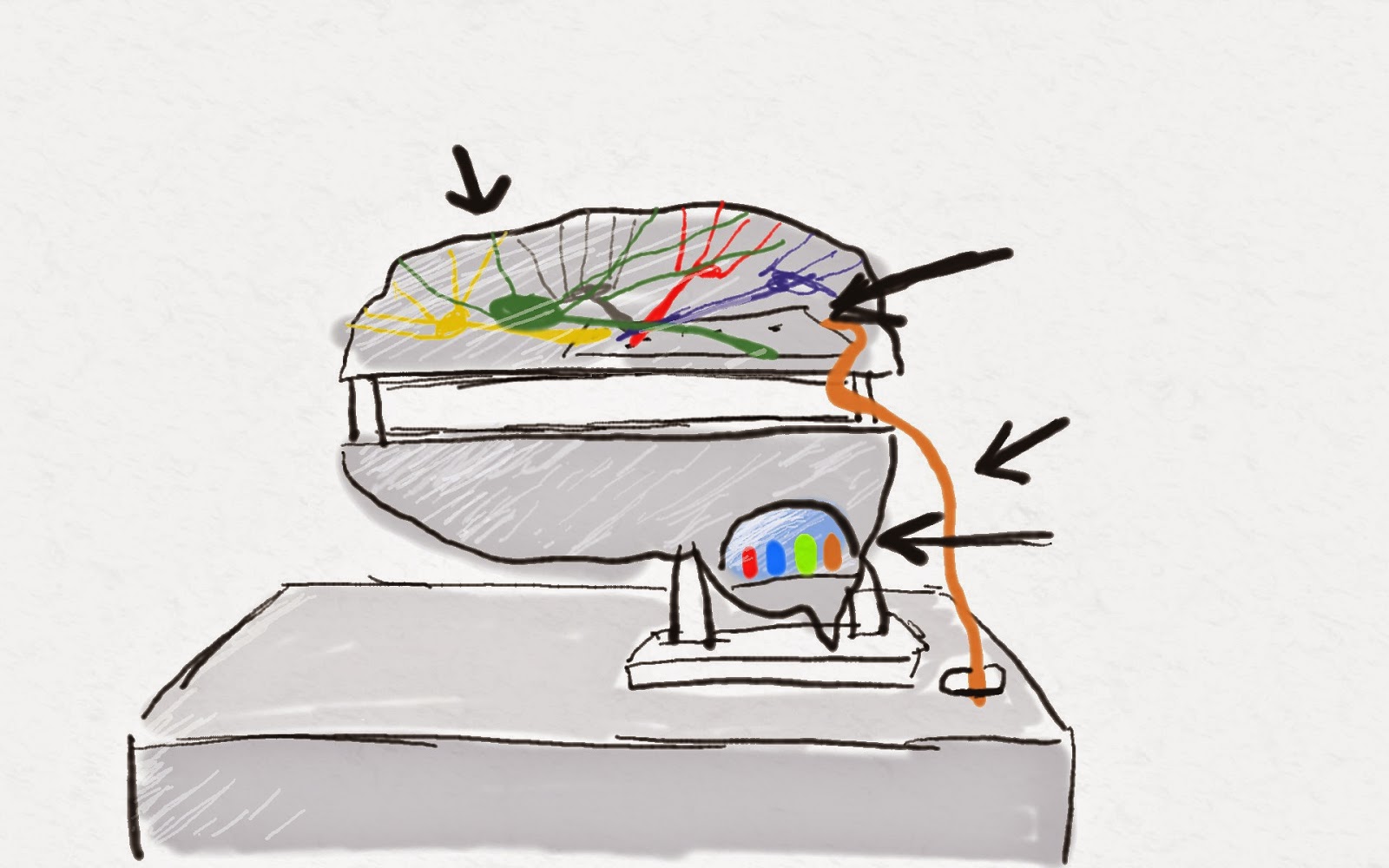
Julia had pleasantly surprised us and went ahead and bought a MaKey MaKey controller kit (mentioned in a previous post as an idea), therefore we could now build our prototype as we had originally intended to.

The way a MaKey MaKey works is it creates a number of circuits between a board, wires and the user's own body. When a specific circuit is closed, an assigned key press is activated.


These key presses are then fed in to the computer using a regular USB connection.

Since the MaKey MaKey by default registers the Up, Down, Left & Right keys, i had to re-assign the key commands in the Quartz Composer project.

With the reconfiguration done, and the plastic brain cut to size, we tested out some of the layout of our final piece, and booked additional equipment (TV & Speakers).

Lastly we went to Homebase as Julia had the idea of forming a base for our brain to help it stand up. Her job was to then assemble the MaKey MaKey in to the plastic brain.


Another idea that we had was the idea of having an led light to light up the brain, to add to the artistic and stylized look we were going for, and to also represent the brain activities.

MAPS & JOURNEYS: Finishing the Software

MAPS & JOURNEYS: Finishing the Software

Continuing on from the last post, whilst Lauren was editing the video, Julia was forming the brain and Josh was editing the audio, i edited the images.

These are the final images used in the project. I decided to go for a very high contrast black and white style to show detail, but at the same time remove some of it.


This style was achieved by playing with the Highlight, Shadow, Blacks, Whites, Detail and Saturation sliders in camera raw. Then in Photoshop i darkened the edges of the frame, focusing the eye on singular details within the image.


At this point the edited video and sounds were ready. Since the Quartz project was modularly designed, it was easy to just replace the video and image with the new ones.

At this step i watched the following tutorials to help me with what i was about to do next:

The images were programmed to be scanned from their folder, and then play one after another back and forth.


This was then rendered in it's own patch for further manipulation, so that a matte could be added in the original composition to give the appearing effect when the sequence is activated


Now, the sound was to be imported.


Since Quartz Composer does not have any tools for audio, i had to download some from http://kinime.net, a website with free plug-ins and resources, forums, etc on Quartz Composer.

The audio was loaded in to the patch. A series of other patches tell the audio player what speakers to use, and then lastly to synchronise the Audio with the picture the Movie Importer tells the Audio Player it's current position.

The same was done for the distorted sounds (loaded as one pre-rendered clip), but connected to a different toggle.

Now with everything linked in to place, and a few extra math patches and switches added to disable the distorted sound and images when the final video is loaded, this is what the final nodes look like:


This is a quick demo of what the final Quartz Composition looks like when run: